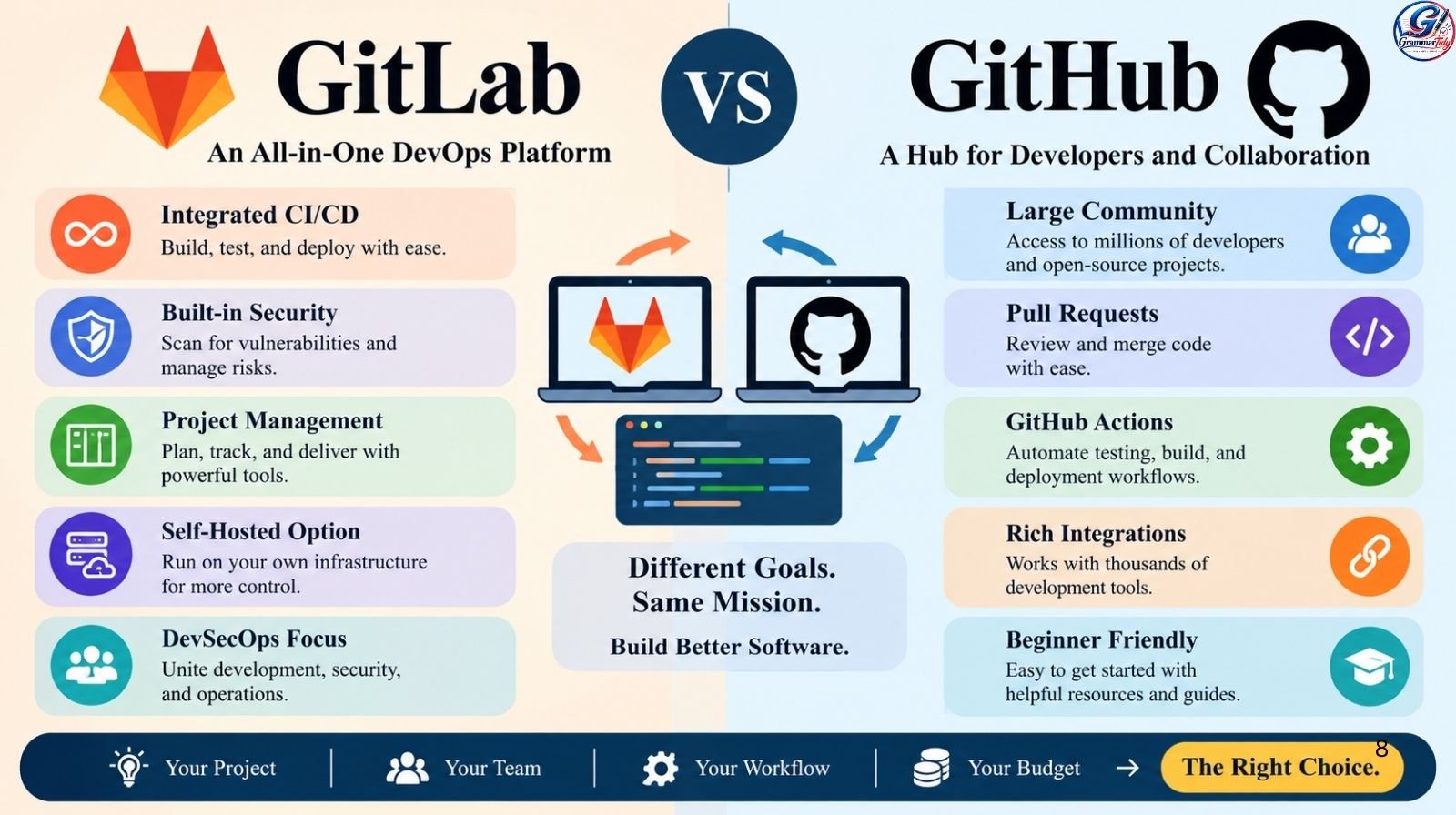
Choosing between GitLab and GitHub can feel confusing, especially when both platforms help developers manage code, collaborate with teams, and automate software development.
Although they share many features, they approach project management, continuous integration, security, and software delivery differently.
So, GitLab or GitHub which one should you choose? The answer depends on your goals. GitHub is an excellent choice for developers who value open-source collaboration, a large community, and an extensive ecosystem of integrations.
GitLab is particularly attractive to teams that want source control, CI/CD, security, and deployment tools within one integrated DevOps platform.
In this guide, you will learn how GitLab and GitHub compare in features, pricing, security, usability, and real-world workflows. By the end, you will have a clearer idea of which platform fits your project, budget, and development team.
Also Read: In Process vs In Progress: The Real Difference With 20+ Examples
What Are GitLab and GitHub?
GitLab and GitHub are web-based platforms built around Git, a version control system that helps developers track changes to source code. Both allow users to create repositories, collaborate with other developers, review changes, and maintain project histories.
However, their broader goals differ. GitHub is widely known for its developer community and collaborative coding ecosystem, while GitLab emphasizes an integrated environment for managing the software development lifecycle.
What Is GitHub?
GitHub is a platform where developers host Git repositories, share projects, review code, manage issues, and collaborate through pull requests. It is particularly popular among open-source communities, independent developers, startups, and organizations of different sizes.
For example, imagine you are building a personal portfolio website. You can store your HTML, CSS, and JavaScript files on GitHub, track changes, invite a friend to review your code, and use GitHub Actions to automate testing and deployment.
GitHub also offers integrations with thousands of development tools and provides access to a large collection of public repositories.
Its main strengths include:
- A large open-source developer community.
- Pull requests and code review workflows.
- GitHub Actions for automated testing and deployment.
- Project management through issues and GitHub Projects.
- GitHub Copilot and other AI-assisted development capabilities.
What Is GitLab?
GitLab is a DevSecOps platform that brings source code management, project planning, continuous integration and delivery, and security workflows together. It is designed to help teams manage more of the software delivery process in one environment.
For example, a software company developing an online shopping application could use GitLab to manage source code, run automated tests, scan for vulnerabilities, and deploy updates through CI/CD pipelines.
GitLab supports cloud-hosted services and self-managed deployments, making it useful for organizations that need greater control over their infrastructure.
Its main strengths include:
- Integrated CI/CD pipelines.
- Built-in security scanning capabilities, depending on the plan.
- Issue tracking and project planning.
- Cloud and self-managed deployment options.
- Tools for coordinating development, security, and operations.
Also Read: Eaten or Aten? The Correct Spelling Explained Simply
GitLab vs. GitHub at a Glance
| Feature | GitHub | GitLab |
|---|---|---|
| Core purpose | Code collaboration and hosting | Integrated DevOps and code hosting |
| Version control | Git | Git |
| Code review | Pull requests | Merge requests |
| Automation | GitHub Actions | GitLab CI/CD |
| Open-source community | Particularly large and active | Active and growing community |
| Project management | Issues and Projects | Issues, boards, epics, and roadmaps |
| Security tools | Built-in features and paid advanced options | Security features vary by plan |
| Deployment options | GitHub.com and enterprise offerings | Cloud-hosted and self-managed |
| Best fit | Open-source collaboration and flexible workflows | Integrated software delivery and DevSecOps |
Both platforms can support professional software development. The most important difference is how you want to organize your development workflow.
GitLab or GitHub: Key Differences in Features
When comparing GitLab or GitHub, look beyond repository hosting. Consider how each platform supports collaboration, automation, project planning, and the full development process.
1. Repository Hosting and Code Collaboration
Both platforms let you create repositories, track code changes, manage branches, and collaborate with other developers.
GitHub uses pull requests to propose changes, discuss code, run checks, and merge contributions. This workflow is especially familiar to developers contributing to public repositories.
GitLab uses merge requests, which serve a similar purpose. Developers can review proposed changes, discuss implementation details, and check pipeline results before merging code into a target branch.
For example, if two developers are building a mobile application, both platforms allow them to work on separate branches and review each other’s changes before combining their work.
Winner: GitHub has an advantage for projects that depend heavily on public collaboration and community contributions. GitLab is equally capable of supporting structured code review within private teams.
2. CI/CD and Automated Workflows
Continuous integration and continuous delivery or deployment (CI/CD) help developers automatically build, test, and release software.
GitHub provides GitHub Actions, which lets teams create workflows triggered by events such as pushing code, opening a pull request, or publishing a release. Its marketplace offers reusable actions for many common tasks.
GitLab provides GitLab CI/CD, which uses pipeline configuration files to define jobs, stages, dependencies, and deployment steps. It supports complex workflows, including parent-child pipelines and multi-project pipelines.
For example, a developer can configure either platform to run unit tests whenever code changes. If the tests pass, the workflow can build an application and deploy it to a staging environment.
Winner: GitLab is a strong choice for teams seeking an integrated CI/CD experience and complex pipeline orchestration. GitHub Actions is excellent for flexible automation, especially when a project already relies on GitHub’s ecosystem.
3. Security and Access Control
Security is important whether you maintain a personal project or develop software for a large organization.
GitHub offers features such as Dependabot alerts, dependency review, secret scanning, and code scanning. The availability of advanced security capabilities depends on the feature and subscription plan.
GitLab offers security scanning and vulnerability management capabilities integrated into its development workflows. However, the depth of available functionality also depends on the plan and deployment configuration.
Consider a team developing financial software. It may need to identify vulnerable dependencies, prevent accidental exposure of API keys, and review security findings before releasing code. Both platforms can support these goals, but the team should compare the specific features, access policies, audit requirements, and costs available in its chosen plan.
Winner: GitLab is attractive when a team wants security integrated into a broader DevSecOps workflow. GitHub is a strong option for teams that prefer its collaboration ecosystem and are comfortable selecting the appropriate security features and integrations.
Also Read: 31st or 31th: Which Is Correct? Meaning, Rules & Examples
4. Project Management and Team Productivity
GitHub provides issues, labels, milestones, discussions, and GitHub Projects for organizing tasks and tracking progress. These features work well for small teams and large development organizations.
GitLab offers issue tracking, boards, milestones, epics, and roadmaps. Depending on the subscription, teams can also access more advanced planning and value-stream analytics features.
For example, a startup launching a new mobile application might use GitHub Projects to organize bugs and feature requests. A larger organization coordinating multiple teams may appreciate GitLab’s integrated planning and delivery workflows.
Winner: GitHub is a practical choice for straightforward task management and developer collaboration. GitLab can be especially useful for organizations that want planning connected closely to code, pipelines, security, and deployment.
GitLab vs. GitHub Pricing: Which Offers Better Value?

Pricing is another important consideration when deciding between GitLab and GitHub. Both platforms provide free options, but paid plans may be necessary when you need advanced security, team administration, increased automation capacity, or enterprise controls.
GitHub Pricing
GitHub offers a free plan for individual developers and organizations. Paid options include GitHub Team and GitHub Enterprise, with features and prices varying by plan and billing terms.
Depending on the subscription, users may also pay separately for advanced security products, additional automation usage, or AI coding assistance.
For a beginner or open-source developer, GitHub’s free offering may be sufficient for hosting repositories, reviewing code, and running basic automation.
GitLab Pricing
GitLab offers a Free tier alongside paid Premium and Ultimate plans. Its paid options provide additional capabilities for project management, administration, security, compliance, and software delivery.
The self-managed option can also affect the overall cost because organizations must account for their own infrastructure, maintenance, backups, and operational requirements.
For teams that would otherwise pay for several separate tools, GitLab’s integrated approach may offer good value. However, that advantage depends on which features the team actually needs.
Which Platform Is More Affordable?
| Your situation | Potentially better choice | Why |
|---|---|---|
| Learning Git and hosting personal projects | GitHub Free or GitLab Free | Both offer useful starting features |
| Contributing to open-source projects | GitHub | Broad community participation |
| Running automated development pipelines | Either | Compare usage limits and workflow requirements |
| Combining development and security tools | GitLab | Integrated DevSecOps capabilities |
| Managing strict enterprise requirements | Either | Compare the exact plan, controls, and total cost |
| Hosting services on your own infrastructure | GitLab | Offers a self-managed deployment option |
Important: Pricing and feature limits can change. Before purchasing, check the official GitHub pricing page and GitLab pricing page. Compare the total expected cost rather than looking only at the starting subscription price.
Also Read: Worse or Worst: What Is The Difference?
GitLab vs. GitHub in 2025–2026: Data and Industry Trends
Developer activity, automation, and AI-assisted coding are changing how teams choose development platforms. Recent public data offers useful context, although it does not establish that one platform is universally better.
What Recent Developer Data Shows
GitHub’s published Octoverse 2025 report, released on October 28, 2025, provides several indicators of the scale of its developer ecosystem.
According to the report:
- More than 180 million developers were on GitHub.
- Developers created more than 230 repositories per minute during the reported period.
- GitHub recorded an average of 43.2 million pull requests merged per month in 2025.
- More than 4.3 million AI-related repositories were present on the platform.
- TypeScript became GitHub’s most-used language in August 2025, overtaking Python and JavaScript by the report’s measure.
These figures demonstrate GitHub’s scale and the growing importance of collaboration, automation, and AI-related software development.
Source: GitHub Octoverse 2025.
What These Trends Mean for Your Decision
A large developer community can make it easier to discover libraries, contribute to open-source software, find examples, and collaborate with other programmers. This makes GitHub especially appealing for developers who want their projects to be discoverable and widely accessible.
However, developer population alone does not measure a platform’s overall quality. A company running complex deployment pipelines may prioritize integrated CI/CD, compliance controls, and security automation over community size.
GitLab’s official GitLab vs. GitHub comparison describes its approach to unifying planning, source control, CI/CD, and security. Because this is a vendor-published comparison, use it to identify features to investigate rather than treating its competitive claims as an independent benchmark.
As of October 2026, the practical lesson is simple: evaluate your own workflow, test the features you need, and compare current subscription limits before committing to either platform.
Real-Life Case Study: Choosing a Platform for a Growing Software Team
Imagine a fictional startup called BrightCart that is developing an online shopping platform. Its team includes four developers, one QA engineer, and one DevOps engineer. Initially, the company needs a reliable place to store source code, review changes, track bugs, and publish application updates.
At the beginning, GitHub could be a natural choice. Its pull requests make collaboration straightforward, its public ecosystem provides useful libraries and examples, and GitHub Actions can automate tests and deployments. Developers can work independently while maintaining a shared review process.
As BrightCart grows, however, the team begins managing more demanding workflows. It wants automated security checks, coordinated releases, clearer visibility into deployment pipelines, and consistent controls across several services.
At this point, the team should evaluate whether GitLab’s integrated CI/CD and DevSecOps capabilities would simplify its operations.
Suppose the team already has dozens of GitHub Actions workflows and several integrations. Moving to GitLab might provide a more unified environment, but migration would also require converting pipeline configurations, checking permissions, validating secrets, and updating integrations.
The change would be worthwhile only if the expected operational benefits justify the effort.
Alternatively, BrightCart could stay on GitHub and improve its existing workflows by adding the appropriate security features and integrations. It could also use GitLab CI/CD with repositories hosted on GitHub if that arrangement fits its technical requirements.
Also Read: Yuwen Win or Lose: Does Yuwen Win or Lose?
The lesson: Choose the platform that solves your team’s actual problems. GitHub may be the better fit when collaboration and existing integrations dominate. GitLab may be more suitable when consolidating development, security, and delivery workflows provides measurable value.
This example illustrates a realistic decision-making process; it is not a report of an actual company’s results.
Which Should You Choose: GitLab or GitHub?
The right platform depends on your experience, project requirements, team structure, and plans for growth.
Choose GitHub If You Want Community and Flexibility
GitHub is a strong choice if you:
- Are learning programming or Git.
- Want to contribute to open-source projects.
- Need a familiar pull-request workflow.
- Depend on a broad ecosystem of development tools.
- Want to use GitHub Actions for testing and deployment.
- Plan to build a public portfolio that employers and other developers can explore.
For example, a computer science student creating projects in Python, JavaScript, or TypeScript may benefit from publishing code on GitHub and collaborating with other developers.
Choose GitLab If You Want an Integrated DevOps Platform
GitLab is worth considering if you:
- Want source control, CI/CD, and security workflows in one platform.
- Need complex pipeline orchestration.
- Want to connect planning and delivery activities.
- Require self-managed hosting.
- Need centralized workflows for development and security teams.
- Want to evaluate a platform designed around the broader software delivery lifecycle.
For example, an engineering team maintaining several services could use GitLab to coordinate code changes, automated testing, vulnerability scanning, and deployment pipelines in one environment.
A Simple Decision Checklist
Use this checklist to narrow your choice:
- Choose GitHub if open-source discovery and community collaboration are your top priorities.
- Choose GitLab if consolidating development and DevSecOps workflows is your main goal.
- Compare both if automated builds and deployments are essential.
- Review security and compliance requirements before selecting a paid plan.
- Calculate migration costs if your team already has repositories, pipelines, and integrations.
- Test your most important workflow on each platform before making a final decision.
Remember that neither platform locks you into a single programming language. Both work with Git repositories and support projects across many languages and frameworks.
Also Read: Honour or Honor: Which Spelling Should You Use?
Mini Quizzes: GitLab or GitHub
Test your knowledge with these 15 quick and easy quizzes about GitLab vs. GitHub. Each question has its answer right below it, so you can learn something useful in seconds!
Quiz 1: What Do GitLab and GitHub Have in Common?
A) They both use Git B) They only support Python C) They are web browsers D) They are operating systems
Answer: A) They both use Git.
Both platforms use Git to track code changes and manage repositories.
Quiz 2: Which Platform Is Especially Popular for Open-Source Projects?
A) GitLab B) GitHub C) Microsoft Word D) Google Docs
Answer: B) GitHub.
GitHub has a large developer community and millions of public repositories for open-source collaboration.
Quiz 3: What Is GitLab Best Known For?
A) Photo editing B) Video streaming C) Integrated DevOps workflows D) Web browsing
Answer: C) Integrated DevOps workflows.
GitLab combines code management, CI/CD, and various security tools in one platform.
Quiz 4: What Does CI/CD Help Developers Do?
A) Design logos B) Automate testing and software delivery C) Write emails D) Create spreadsheets
Answer: B) Automate testing and software delivery.
CI/CD helps teams test code automatically and streamline software releases.
Quiz 5: What Is a GitHub Pull Request Used For?
A) Reviewing and proposing code changes B) Deleting an operating system C) Editing photos D) Installing computer hardware
Answer: A) Reviewing and proposing code changes.
Pull requests let developers discuss, review, and merge proposed code changes.
Quiz 6: What Is GitLab’s Equivalent of a Pull Request Called?
A) Code ticket B) Build request C) Merge request D) Project folder
Answer: C) Merge request.
GitLab merge requests allow teams to review proposed changes before merging them into a branch.
Quiz 7: Which Tool Provides Automation in GitHub?
A) GitHub Actions B) GitHub Photos C) GitHub Browser D) GitHub Writer
Answer: A) GitHub Actions.
GitHub Actions automates tasks such as running tests, building applications, and deploying software.
Quiz 8: True or False: Both GitLab and GitHub Support Git Repositories.
Answer: True.
Both platforms host Git repositories and help developers manage code history, branches, and changes.
Quiz 9: Which Platform Offers a Self-Managed Deployment Option?
A) GitHub only B) GitLab C) Neither platform D) Google Docs
Answer: B) GitLab.
GitLab supports self-managed installations, giving organizations more control over their hosting environment.
Quiz 10: Is GitHub Useful for Beginners Learning to Code?
A) No, it is only for experts B) Yes, it offers repositories and collaboration tools C) No, it only stores images D) Yes, but only for Java
Answer: B) Yes, it offers repositories and collaboration tools.
Beginners can store projects, track progress, explore public code, and build a programming portfolio.
Quiz 11: Which Platform Uses GitLab CI/CD?
A) GitHub B) GitLab C) Both use that exact tool name D) Neither platform
Answer: B) GitLab.
GitLab CI/CD lets developers define automated pipelines for building, testing, and deploying software.
Quiz 12: True or False: GitHub Can Automate Software Testing.
Answer: True.
Developers can configure GitHub Actions to run tests when code is pushed or a pull request is opened.
Quiz 13: Which Platform Might Suit a Team Wanting an Integrated DevSecOps Workflow?
A) GitLab B) A text editor alone C) A photo-sharing app D) A web browser alone
Answer: A) GitLab.
GitLab brings development, security, and operations workflows together, although available features vary by plan.
Quiz 14: Are GitLab and GitHub Both Available With Free Plans?
A) Yes B) No, both require payment C) Only GitLab has a free option D) Only GitHub has a free option
Answer: A) Yes.
Both offer free plans, but certain advanced features and usage limits depend on the subscription.
Quiz 15: What Is the Best Way to Choose Between GitLab and GitHub?
A) Choose randomly B) Always choose the more expensive plan C) Compare your workflow, features, and budget D) Avoid testing either platform
Answer: C) Compare your workflow, features, and budget.
Frequently Asked Questions
1. Is GitLab better than GitHub?
Neither platform is universally better. GitLab may be preferable for teams that want integrated DevOps, CI/CD, and security workflows. GitHub may be preferable for open-source collaboration, community reach, and an extensive integration ecosystem.
2. Is GitHub easier for beginners than GitLab?
GitHub is often a convenient starting point because of its large community, tutorials, and public repositories. However, GitLab also supports beginner-friendly Git workflows and offers useful free features. The easiest option depends on your goals and familiarity with the interface.
3. Can I use GitLab and GitHub together?
Yes. You can host repositories on GitHub while using GitLab for certain automation or delivery workflows, provided you configure repository access, triggers, permissions, and integrations correctly. GitLab also supports repository mirroring. This setup can be useful when a team wants to adopt new CI/CD capabilities without immediately moving every repository.
4. Which is better for CI/CD: GitLab or GitHub?
GitLab CI/CD is particularly attractive for integrated pipelines and complex multi-project workflows. GitHub Actions offers flexible automation and a broad ecosystem of reusable actions. The better choice depends on pipeline complexity, runner requirements, existing integrations, and usage costs.
5. Is GitLab free to use?
Yes. GitLab offers a Free tier, with additional features available in paid plans. Some advanced security, administration, planning, and compliance capabilities depend on the subscription. Check the official pricing page for current limits.
6. Do GitLab and GitHub use Git?
Yes. Both platforms are built around Git, which tracks source-code history and supports branching and merging. You can use familiar Git commands such as git clone, git pull, git commit, and git push with repositories hosted on either platform.
7. Can I move my project from GitHub to GitLab?
Yes. Git repositories can be transferred or mirrored, and GitLab provides importing options for supported GitHub data. However, moving a project may require additional work to transfer issues, pull requests, permissions, secrets, automation workflows, and integrations. Review the migration process before switching.
Conclusion:
When comparing GitLab or GitHub, the best choice comes down to what you need from your development workflow.
Choose GitHub if you value open-source collaboration, a large developer community, flexible automation, and easy access to public projects. It is an excellent starting point for students, independent developers, and teams that already use GitHub’s ecosystem.
Choose GitLab if you want an integrated platform for source control, CI/CD, security, project planning, and software delivery. It is particularly worth evaluating when centralized DevSecOps workflows or self-managed hosting are important.
Before deciding, list your essential features, review current pricing, and test a small project on both platforms. Pay attention to how easily you can review code, run automated tests, manage permissions, and deploy changes.
Ready to choose your platform? Start with GitHub if community collaboration is your priority, or explore GitLab if you want a more integrated DevOps workflow. The best platform is the one that helps your team build, secure, and deliver software efficiently.
Discover More Article
- With or Without You Lyrics: Meaning, Song Details And More
- When Does Trick-or-Treating Start? Halloween Hours Guide
- Winter Spring Summer or Fall: Meaning, Movie, And Season Order
- Who Won The Vietnam War: U.S. Or Vietnam?
Keep learning with more easy grammar lessons on GrammarTidy.com

Hi, I’m Noor Fatima, the author and creator of Grammar Tidy. I’m passionate about grammar, writing, and making language learning simple and enjoyable. Through Grammar Tidy, I share helpful tips, clear explanations, and practical guidance to help readers improve their writing, avoid common mistakes, and communicate with confidence. My goal is to make better grammar easy, useful, and accessible for everyone.